30-Day Geometry Dash Spam Practice Plan
This plan does not promise that you will reach a particular CPS number. The goal is to create a repeatable practice routine and compare your own results over time.
Use the five preset names exactly as shown in the trainer: Normal, Mini, Spam, Precision and Endless. Keep the same difficulty when comparing runs. The progression rule below is an editorial exercise: advance one setting only after three completed timed runs; step back when the same entry fails repeatedly. It is not a game ranking or a proven improvement threshold.
Your 30-day task list and log
Use one row per session; the day number is a sequence, not a deadline. Notes save on this browser when local storage is available. Export a CSV to keep your own copy. Nothing in this log is uploaded by the practice tool.
0 / 30 days checked
Day 1: Baseline
Save three 10-second CPS runs using one input method. Write the median, range and device.
Next step: Keep these conditions for days 8, 15 and 30.
Day 2: Normal Wave
Try three Normal Wave runs at one comfortable difficulty. Record survival and the first collision side.
Next step: Keep the same difficulty tomorrow.
Day 3: Release timing
Repeat day 2. If the first collision is above, shorten the hold; if below, shorten the release. Change only that timing.
Next step: Record whether the first collision changed.
Day 4: Steady rhythm
Do three comfortable 5-second CPS runs, then two Normal Wave runs. Avoid a maximal burst.
Next step: Compare control, not just CPS.
Day 5: Link the skills
Repeat day 4 with the same setup. Record the two wave survivals beside the CPS series.
Next step: Keep the pace that remains controllable.
Day 6: Review
Read the first five logs. Choose the most repeated failure: drift, late reversal or inconsistent setup.
Next step: Write one correction for next week.
Day 7: Rest
Take a day away from repetitive speed drills. Check that all baseline conditions were written down.
Next step: A missed day can be a rest day; do not double the next dose.
Day 8: Baseline repeat
Repeat day 1’s three 10-second tests. Compare medians and ranges using the same duration and device.
Next step: Treat an isolated best as a separate result.
Day 9: Short speed
Try three 1-second bursts with breaks. Then do two comfortable Normal Wave runs.
Next step: Keep the bursts only if control remains comfortable.
Day 10: Control check
Repeat the day-2 Normal Wave setting three times, using the correction selected on day 6.
Next step: Log how many runs avoid the original first collision.
Day 11: Mini introduction
Open Mini Wave for two short attempts at a comfortable difficulty, then return to Normal for one.
Next step: If the path is unreadable, repeat Normal next time.
Day 12: Mini retest
Repeat day 11 with the same difficulty. Record whether the error is high, low or at a transition.
Next step: Change hold length rather than forcing extra speed.
Day 13: Review
Compare Normal and Mini notes. Pick one preset for the next block; keep its difficulty fixed.
Next step: Do not compare survival across different presets as the same task.
Day 14: Rest
Skip speed drills. Revisit your first-collision notes and prepare the same input setup for day 15.
Next step: Resume only when comfortable.
Day 15: Midpoint baseline
Repeat three 10-second CPS runs from day 1 and three runs at the day-2 wave setting.
Next step: Record both typical speed and control; keep unchanged results too.
Day 16: Repeatability
Do three runs in the preset chosen on day 13. Note the number of completed timed runs.
Next step: Use completed runs out of attempts, not just the best survival.
Day 17: One progression
If all three day-16 timed runs completed, increase one difficulty step. Otherwise repeat day 16.
Next step: Keep every other setting unchanged.
Day 18: Progression retest
Repeat day 17’s setting three times. If all fail at the entry, return one step and isolate that entry.
Next step: Keep the failed setting in the log so the task remains traceable.
Day 19: Pacing
Run one comfortable 15-second CPS test. Compare its first and last seconds by feel; do not force a maximum.
Next step: If pace collapses, choose a lower repeatable pace next session.
Day 20: Control after pacing
Use three attempts at the same wave preset as day 18. Test the lower pace if day 19 was unstable.
Next step: Observe collisions and completion rate, not only CPS.
Day 21: Rest and review
Skip clicking drills. Identify one successful correction and one still-open question.
Next step: Use the open question for the next real-game task.
Day 22: Real-game target
Choose one level you already play. Write its exact ID, version and one short practice section’s boundaries.
Next step: Select a section you can inspect; a famous Extreme Demon is optional.
Day 23: Section baseline
In the real game, start at the same checkpoint five times. Record completed sections out of five.
Next step: Keep starting position and checkpoint conditions fixed.
Day 24: Isolate an error
Repeat that section, focusing on the first failed press, release or transition identified yesterday.
Next step: Name the input change; do not just write ‘more CPS’.
Day 25: Join sections
If the target section is repeatable, add its entry or next subsection. Otherwise repeat day 24.
Next step: Write the new boundaries; it is a different task.
Day 26: Transfer check
Do two runs in the matching browser preset and then repeat the real-game target section.
Next step: Compare the kind of error; the two engines have different physics.
Day 27: Review
Compare days 23–26. Check whether the same error is less frequent at the original boundaries.
Next step: If there is no change, choose a different timing correction.
Day 28: Rest
Take a rest day and restore the exact day-1/day-2 setup for the final comparison.
Next step: Do not cram missed drills.
Day 29: Rehearsal
Do one comfortable 10-second CPS run and one original Normal Wave run. Check settings and record any changes.
Next step: This is a setup check, not a peak attempt.
Day 30: Final comparison
Repeat three original 10-second CPS runs and three original wave runs. Compare with days 1, 2 and 15.
Next step: Write median/range, control results and one next-month decision. No change is a valid result.
A repeatable session you can use throughout the month
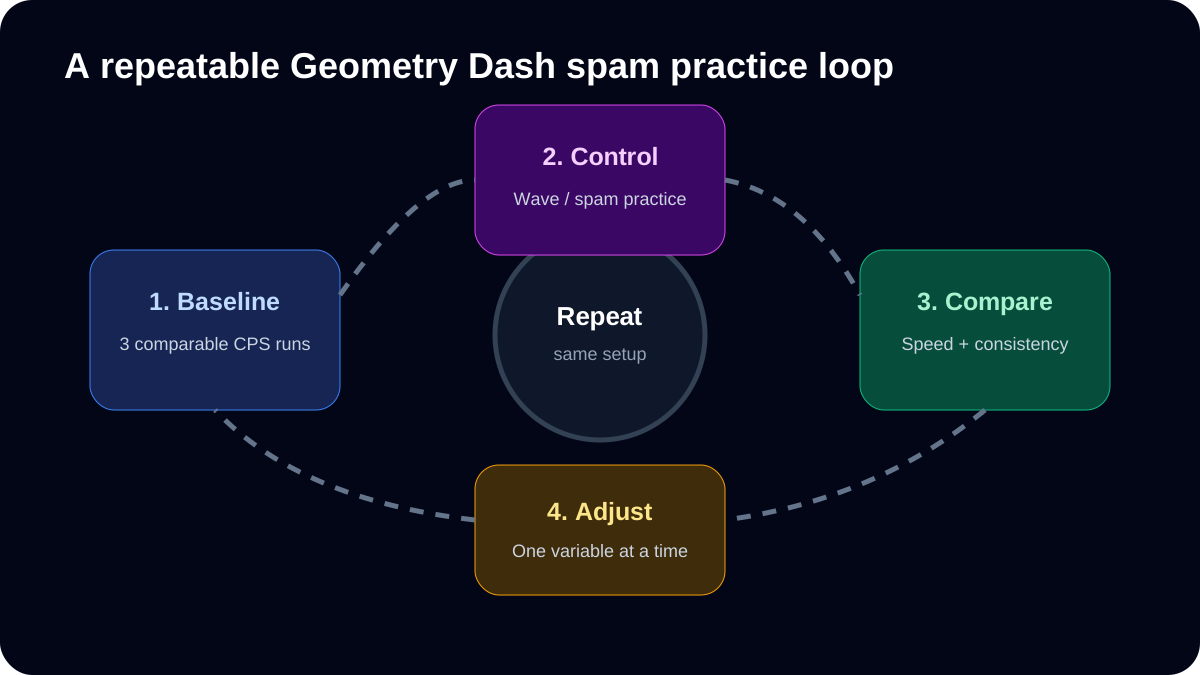
The daily tasks above are intentionally adjustable. For a short practice session, warm up at a comfortable pace, run three CPS attempts of the same duration, take a break, then perform two or three runs at one fixed wave setting. Finish by noting what changed. Keep high-effort sessions short and allow recovery; the site does not prescribe a medically validated training dose.
| Record | Example entry | Why it matters |
|---|---|---|
| Setup | Mouse, same browser, 10s test | Avoid mixing device differences with skill changes |
| CPS series | 6.4 / 6.8 / 6.5 (illustrative) | Compare typical results, not one peak |
| Wave setting | Normal, Hard, no Mini | Keep the task comparable |
| Control note | Late reversals at tighter turns | Identify the next skill to practice |
| Next session | Keep setup; work on release timing | Change one variable |
These numbers are examples, not results from users or promises of improvement. At the end of day 30, repeat your day-one conditions. If the results are similar, that is useful evidence too: you may need a different drill rather than simply more effort.
Original exercise / comparison: a reusable log format for this site's CPS and Wave tools.
Rest between repeated high-effort attempts and stop if a session causes pain or numbness.
This page is the month-long schedule. For troubleshooting individual errors, use 10 Common Geometry Dash Spam Mistakes.
Ready to Test Your Skills?
Don't just read about it. Put your clicking speed and wave consistency to the test right now.
Written By
Geometry Dash Spam Editorial
Maintains the site's browser tools and source-checked training guides.