10 Common Geometry Dash Spam Mistakes and How to Fix Them

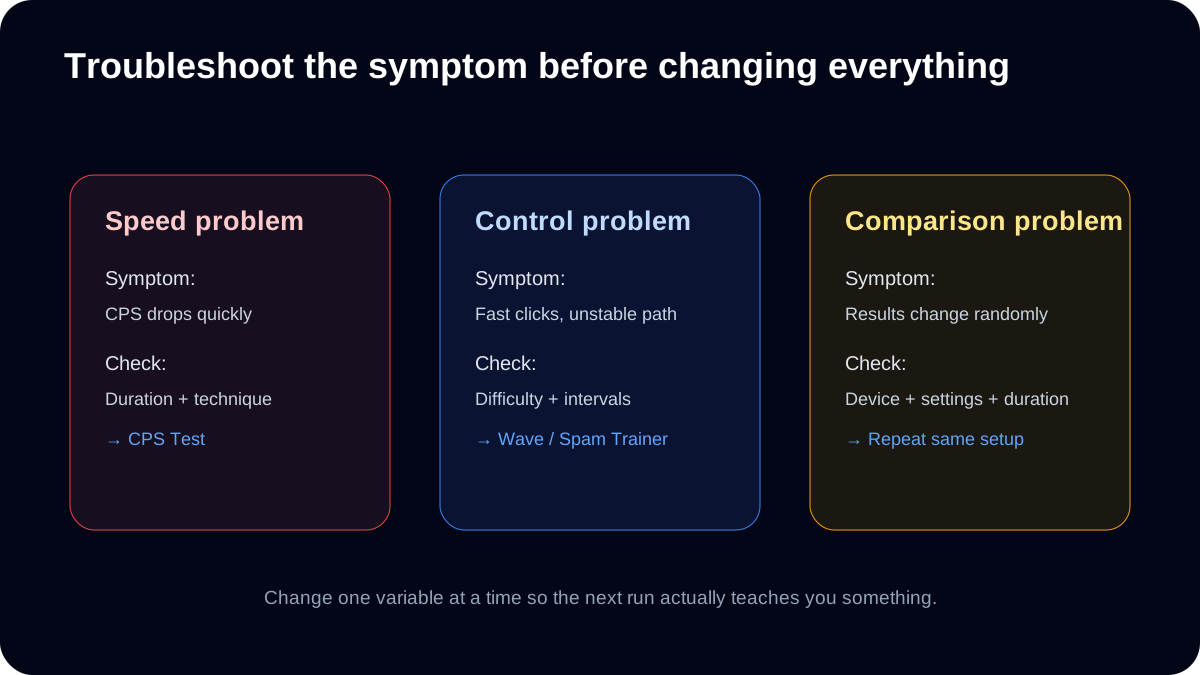
Quick diagnostic: decide whether the problem is raw speed, movement control or an inconsistent test setup before changing technique, hardware and difficulty at the same time.
1. Chasing only peak CPS
Symptom: Your best one-second burst rises, but most 10-second runs stay the same.
Correction: Run three fixed 10-second tests at a comfortable pace and compare their median and range.
Retest: A useful change appears in typical runs; a new peak alone does not resolve the symptom.
2. Changing settings every attempt
Symptom: Your saved wave times jump, but each run uses a different gap or Mini setting.
Correction: Choose one preset and difficulty for a three-run block. Write down both before starting.
Retest: The next block can be compared to the same task; mark changed settings separately.
3. Starting too difficult
Symptom: Every run ends at the first narrow turn, before you can tell what went wrong.
Correction: Step down one difficulty and name the first collision side. Adjust the next hold or release slightly.
Retest: Look for a repeatable path through that turn before adding the tighter gap again.
4. Tensing the whole arm
Symptom: Your grip shifts while trying to force a faster pace.
Correction: Stop the attempt, restore a comfortable supported position, and use a lower-effort pace.
Retest: Check whether the same finger position can be repeated; do not pursue a score through discomfort.
5. Ignoring click intervals
Symptom: Two runs show similar CPS, but one has long pauses between bursts.
Correction: Compare interval SD on runs with enough clicks. Try even, comfortable taps in the next block.
Retest: Look for less interval variation at similar average CPS; SD needs at least two intervals.
6. Training only 1-second tests
Symptom: A fast start turns into a much slower finish in the 10-second test.
Correction: Choose a pace you can maintain through ten seconds. Use short bursts as a separate exercise.
Retest: Compare three whole-run averages; do not mix 1-second and 10-second records.
7. Treating browser scores as game-engine measurements
Symptom: A high browser score does not clear a specific game transition.
Correction: Write the actual level ID and transition boundaries. Practice that transition in the game.
Retest: Count completions from the same checkpoint; the browser score is not the pass criterion.
8. Skipping movement practice
Symptom: CPS improves while the wave still drifts into the same wall.
Correction: Open Normal Wave and balance hold and release time. Keep CPS comfortable while changing one half of the cycle.
Retest: Observe whether the drift or first collision changes before raising speed.
9. Comparing different devices without controlling variables
Symptom: A phone run and a mouse run use different durations and techniques.
Correction: Create one three-run series per setup at the same duration. Record screen, input and finger technique.
Retest: Compare complete setups; do not attribute the whole difference to one hardware specification.
10. Continuing through pain
Symptom: Repeated clicking produces pain, numbness or persistent discomfort.
Correction: End the drill. Do not use a higher score as a reason to continue.
Retest: Do not schedule a score-based retest while symptoms persist. Seek appropriate advice if they continue.
Choose one fix based on the result you saw
If your CPS collapses in longer runs, compare a comfortable 10-second test with a 30-second test using the same device. If the score is similar but your wave fails earlier, lower the wave difficulty and focus on the exact reversal that causes the problem. If the numbers jump randomly between runs, stop changing settings: use the same browser, test length and input method until you have a comparable baseline.
Do not interpret the browser consistency percentage as a medical or neurological measurement. The score only describes variation in timestamps received by this page. Repeated discomfort is a reason to stop, not a training metric to push through.
A simple workflow is CPS Test → Spam Test → Wave Trainer.
This page is for troubleshooting. If you want a structured progression schedule, use the 30-Day Geometry Dash Spam Practice Plan.
Ready to Test Your Skills?
Don't just read about it. Put your clicking speed and wave consistency to the test right now.
Written By
Geometry Dash Spam Editorial
Maintains the site's browser tools and source-checked training guides.